Working with Vector Files
Vector datasets store geometries together with attribute data in a table-like structure. Each row represents a geographic feature, while one column contains the geometry and the remaining columns store descriptive attributes. Vector data is commonly stored in formats such as Shapefiles or GeoPackages, which define how geometries, attributes, and coordinate reference systems are stored.
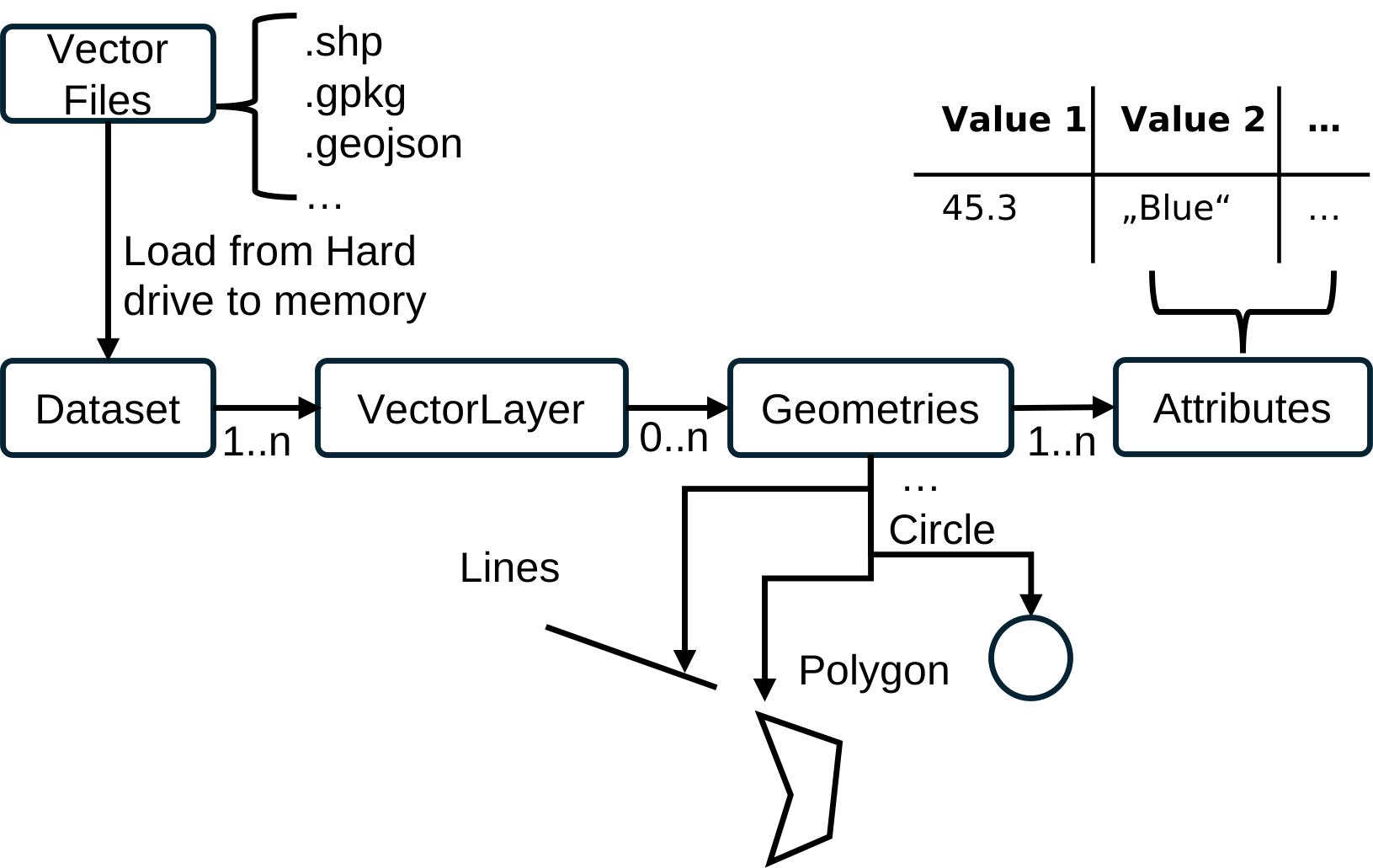
General Structure of Vector Data
The figure above summarizes how vector data is organized on disk. A vector dataset is made up of:
- Geometry files that store the actual shapes (points, lines, polygons)
- Attribute tables that hold descriptive fields for each feature.
- A coordinate reference system definition, which tells software how to interpret coordinates.
- Optional index or metadata files that speed up access and record provenance.
Together, these components form a single logical dataset: a table of features with geometry plus attributes. The exact set of files depends on the format (e.g., Shapefile uses multiple sidecar files, while GeoPackage stores everything in one container), but the logical structure is the same.
ETHOS.GeoKit Vector Capabilities
ETHOS.GeoKit provides comprehensive tools for working with vector data, enabling you to read, analyze, manipulate, and visualize geospatial features. The library supports common vector formats and offers functionality for both simple and advanced spatial operations.
Reading and Analyzing Vector Files
ETHOS.GeoKit supports reading and working with multiple vector file formats:
-
Shapefiles – The Analyzing Shapefiles example demonstrates how to load and inspect Shapefile datasets, which consist of multiple component files (.shp, .dbf, .shx, .prj) that must be kept together.
-
GeoPackages – The Analyzing GeoPackages example shows how to work with GeoPackage files (.gpkg), which store all data in a single container and can hold multiple vector layers.
Visualization
ETHOS.GeoKit makes it easy to visualize vector data:
- Basic Visualization – The Visualizing Vector Data example demonstrates how to plot vector datasets and overlay multiple vector files to explore spatial relationships and compare features.
Attribute Management
Vector datasets combine spatial geometries with descriptive attributes:
- Attribute Extraction and Manipulation – The Attribute Operations example shows how to extract existing attributes, calculate new properties (like area), and add custom attribute columns to your vector datasets.
Spatial Operations
ETHOS.GeoKit provides powerful tools for spatial analysis and manipulation:
-
Spatial Filtering – The Spatial Filtering example demonstrates how to filter vector data based on spatial relationships and clip geometries to specific regions of interest.
-
Buffering – The Creating Buffers example shows how to create buffer zones around geometries, useful for analyzing exclusion zones or proximity relationships.
-
Subdividing Geometries – The Subdividing Geometries example demonstrates how to break down large geometries into smaller tiled regions using the tileize function.
These capabilities make ETHOS.GeoKit a versatile tool for vector data processing workflows, from simple data inspection to complex spatial analysis tasks.
Create Geodata
At some point you might need to create your own geodata from some kind of analysis. In this case, it might come in handy to create it from a pandas data frame. For example, you can create:
- A shapefile (.shp) with one vector layer
- or a geopackage (.gpkg) with one vector or multiple vector layers.